Camera practice
Practice a squat with private on-device rep counting, timing, and count corrections. Practice sets are not saved to your workout.
Open camera practiceACTIVE MEMBERS ONLY
MEMBER SIGN INSign in to open your workout plan, dashboard, nutrition tools, and check-ins.
OPTIONAL MOVEMENT CHECK
PRIVATE PREVIEWThis movement check is optional. Your current plan stays saved. Choose “Back to plan” above to leave without changing it.
VIEW 1 OF 2 · FRONT VIEW
Choose your settings, record a comfortable movement, then review your selected images and feedback. You can continue without using your camera.
No bar is required. Keep the area clear, use only a comfortable depth, and stop if you feel pain, dizziness, or instability. Have a sturdy support or another person nearby if balance is a concern.
Stand with feet about shoulder-width apart and toes slightly turned out. Raise your straight arms overhead, with biceps near your ears and palms facing each other. Squat with control and let your knees track in line with your toes.
Turn sideways with your whole body and feet visible. Keep your arms overhead, send your hips back, let your knees bend naturally, and keep a comfortable neutral spine. Use only a depth you can control—never force below parallel.
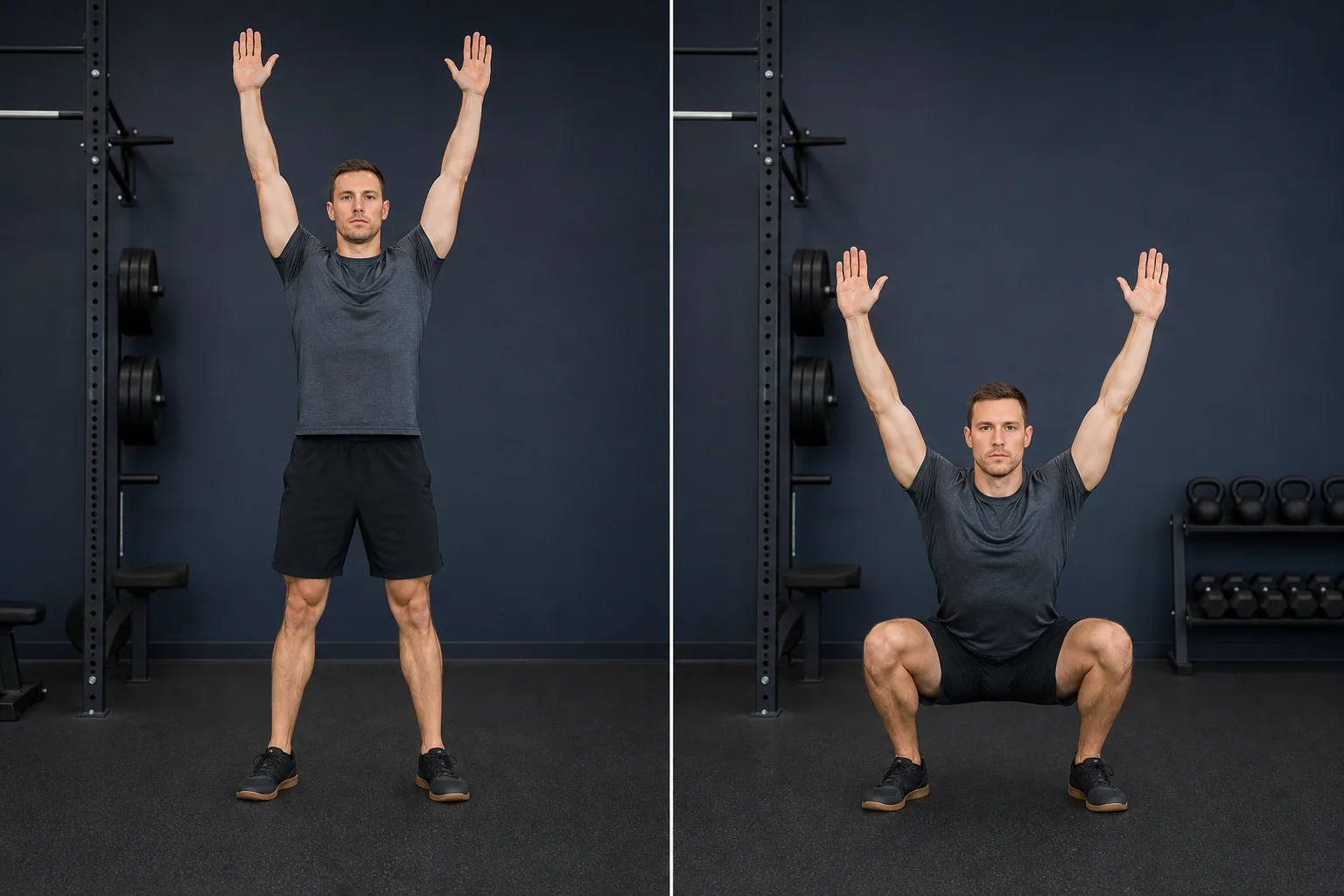
Face the camera with feet about shoulder-width apart and toes slightly turned out. Raise your straight arms overhead, then complete up to three slow, controlled squats.
Allow on-device camera tracking and voice commands through your browser’s speech service. Choosing Review sends selected stills to OpenAI; video stays on this device.
Goals Coach saves coaching observations, not images or command transcripts. Remembered for this sign-in; revoke in Menu. Your phone may also request camera or microphone access.
Choose permission once, then set up your camera and voice.
Camera access has not been requested.
WORKOUTS
Your plan is selected.
COACH TOOLS
Check in with your coach, update the information that shapes your plan, or choose an exercise for camera-based form coaching.
Practice a squat with private on-device rep counting, timing, and count corrections. Practice sets are not saved to your workout.
Open camera practiceReview how your week went and approve any suggested plan adjustments.
Review pain, medical limits, goals, schedule, and exercise preferences. You can stop and resume without replacing your current plan.
Repeat the optional front-and-side movement assessment independently after your health screen is safely complete.
Choose a supported exercise, review its demonstration, then open the camera when you are ready.
Availability is checked after sign-in. Nothing is recorded or sent without your consent.
Health and fitness assessments can be updated independently. Your current plan remains saved until an updated assessment is completed.
WORKOUT LOCATION
Changes equipment choices for this visit. Your home gym and saved workouts stay unchanged.
EXERCISE LIBRARY
Search Legacy’s supported exercises for instructions, demonstrations, and form checking. Browsing here does not change your coach-generated plan.
Equipment availability reflects the workout location selected above.
Enter at least two characters, or browse all supported exercises.
Choose up to eight supported exercises. This saves separately and never replaces your Goals Coach plan.
Optional sets and reps are your own targets, not a coach prescription. For timed exercises, leave them blank and follow the exercise guidance.
MY WORKOUTS
Track your active workout and review completed workouts below.
MY GOALS COACH
Your plan, progress, nutrition, and fitness profile in one place.
LAST 7 DAYS
Loading your recent activity…
WORKOUT AND NUTRITION PROGRESS
Approved connected-device data can provide context alongside your goals and assessments to help personalize workouts and meal guidance. It does not automatically change your plans. Compare 7, 30, or 90 days. Nutrition consistency uses only target ranges you save; untracked or incomplete days are not scored.
WEEKLY CHECK-IN
See your latest approved check-in update and a simple reminder for when to check in again.
MEASUREMENT HISTORY
Up to 12 recent entries for each measurement, shown without judging the direction.
WORKOUT HISTORY
Start with your five most recent completed sessions, then load more when you want them. This is your recorded history—not a score or ranking.
FOODS AND MEALS YOU TRACKED
Estimated totals from foods and meals you marked “I ate this.” Anything you did not track is not included.
CONNECTED ACTIVITY
Workout summaries you chose to import, labeled by source. These are coaching context—not a score or medical conclusion.
If you choose this, only your imported Polar workout count and total minutes from the last seven days are sent to Goals Coach. Heart-rate values, dates, provider payloads, and member identifiers are not sent.
Goals Coach stores these details separately from GymMaster so changes can have clear history and ownership.
Each entry keeps its measurement date and source. New entries never erase earlier ones.
Illness, stress, poor sleep, and recent activity can change a reading. If an unusual reading comes with chest pain, fainting, severe shortness of breath, or another concerning symptom, seek appropriate medical care instead of relying on this app.
No measurements yet.
Connections are optional. You choose each type of data Goals Coach may read, and disconnecting stops future imports without rewriting prior source history.
Approved connected data can provide context alongside your goals and assessments to help personalize workouts and meal guidance. It does not automatically change your plans or replace safety screening.
Connected data can help personalize your next plan review alongside your goals, feedback, and assessments. It will not change your current workout or meal plan without a review and your confirmation. Imported records keep their provider and recorded time. They do not diagnose a condition or guarantee recovery. Member-requested early plan updates are planned, not available yet.
These counts are a private activity summary, not a score or medical conclusion. Measurements support coaching trends; they are not a diagnosis or medical clearance. Goals Coach will not automatically change your plan from one unusual reading.
TODAY
Start here. Your next workout, meal, check-in, and gym access are one tap away.
GymMaster checks your membership and decides access.
Choose to share a temporary nickname and zone label with your gym display. Live sharing is not enabled in this environment; no heart rate is being shared.
Move together, your way. Challenges are private by default and group participation requires an invitation. Challenge participation is not enabled in this environment.
GOALS COACH CHALLENGES
Choose whether to participate. Challenges are private by default; joining a group requires an invitation.
Your challenge is private by default. Proof photos require separate consent and remain owner-only. Image bytes become unavailable at the retention deadline and are queued for removal. Minimal proof, access-audit, and cleanup records remain retained.
MAKE A MEAL
PERSONALIZED FOR YOU
Pick one choice from each column. Portions keep calories and main macros within a practical range while you choose foods that fit your life.
Scan available food information. Nothing is logged until you review the result in the food editor and choose “I ate this.”
Only the barcode is sent to Open Food Facts. Product data is provided under its applicable database license. Open Food Facts attribution.
Choose an image without faces, bystanders, receipts, addresses, or other personal details. Crop or retake it if needed. The image is sent to OpenAI only after you consent and tap Send. OpenAI does not train on API data by default and may retain abuse-monitoring logs for up to 30 days. Goals Coach does not store the photo.
AI and barcode estimates may be incomplete or inaccurate. This is not an allergy check, medical advice, or an exact measurement.
Select every item that applies. Choices update immediately and stay only for this signed-in visit.
Allergy reminder: Filters remove foods tagged with the selected allergen, but recipes, brands, preparation, and cross-contact vary. Always check ingredient labels and your own allergy guidance before eating. For a prescribed diet, pregnancy, kidney disease, diabetes medication concerns, or eating-disorder support, use guidance from your qualified healthcare professional.
Suggestions cycle eligible catalog foods as starting points. They are not a nutrition prescription; any meal range you enter is your choice.
Catalog choices only. Review portions and ingredients before eating. Building a draft does not save or record a meal.
Try a different unsaved catalog meal idea for this meal type. Review the foods and portions before eating; this does not record a meal.
1 serving uses the listed food portions. Changing servings scales the whole meal, not individual foods.
“I ate this” records this meal now. It does not save the meal as a favorite.
Use the serving information from the food label or your measured portion. Blank nutrition fields stay unknown; enter 0 only when the label says zero.
Choose this food’s role and the amount you would use. Catalog companions use their listed portions. This is an unsaved idea; use the separate food editor to record what you ate.
Ranges are your choice for this meal, not a share of daily targets. Protein closeness takes priority; calories break ties. Unknown nutrients stay unknown.
FOODS AND MEALS YOU LOGGED
Estimates use only foods and meals you marked “I ate this.” Missing entries are not counted, so this is not a full-day analysis or a nutrition target.
Only foods and meals you marked “I ate this” appear here. Nutrition values are practical estimates, and missing entries are not included.
Nutrition values are practical estimates, not a medical prescription. Cooking methods, brands, toppings, sauces, and serving sizes can change the totals.